Watershed Transforms
Transforms a multi-ROI by applying a Watershed segmentation using the labeled objects in the multi-ROI as the seed points and a selected dataset as the landscape image. You should note that in this case, a Sobel is not evaluated, as it is for the Compute Watershed option. You should also note that the different labels in the selected multi-ROI need to provide enough information for the seed points to prevent bleeding from one object to another.
 How to Transform a Multi-ROI Through a Watershed
- Make sure that the labeled objects in the multi-ROI you plan to use as the seed points can provide enough information to prevent bleeding from one region to another.
- Right-click the multi-ROI what will provide the seed points and then choose Watershed Transform in the pop-up menu.
- Choose the dataset that will provide the local topography for the Watershed algorithm in the Choose a landscape dialog, as shown below.
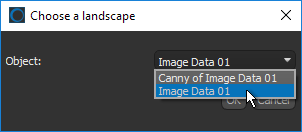
In some cases, it may be best to create a dataset with clearly defined edges as the landscape image. See for Image Filters and Settings information about processing image data with Dragonfly's edge detection filters.
- Click OK.
The Watershed is evaluated with the selected ROIs as the seeds and the selected dataset as the landscape image.
Wait for the expanded objects to be computed and then overwritten into the initial multi-ROI.


